

Notifications
BuiltA notification is the message Omniglass sends somebody when an alarm opens or clears, to the chat or paging tool they already watch. This page walks the one task end to end: send an alarm to a chat channel. Three pieces take part, each answering one question (alarms and actions):
- a notification target says where (a webhook URL, and the secret it signs with);
- an action rule says when (on which transitions, under which predicate);
- a notification type says what (the subject and text, rendered over the alarm’s facts).
All three live in the console on Catalog, under Actions: Notifications (the types),
Action rules and Notification targets, side by side. Targets are admin-only (notification_target:*): a
target is a destination the server sends to, holding a credential, and its URL is often itself a
credential, so the Notification targets entry is not shown to anyone else. Action rules ride rule:*: anyone who
reads rules sees them, and writing one takes an all-scope grant. Notification types are a catalog an
operator writes (notification_type:create,update). Every step below is also a CLI command, shown
beside it.
1. Open the destination
Section titled “1. Open the destination”A self-hosted chat server usually sits on a private address, which Omniglass refuses to send to
until an admin names it. Name it in the egress_allow setting of the notification namespace, as
a CIDR, an address or a host name (each is checked as it is written; a cloud metadata address is
refused whatever it says):
# Settings > notification > egress_allow, or PATCH /api/v1/settings/notification:{"egress_allow": ["chat.corp.example", "10.20.0.0/16"]}A public destination (a hosted chat or paging service) needs nothing here. Plain http is only
for a destination the list names; anything else is https, its certificate verified.
2. Make the target
Section titled “2. Make the target”Store the signing key as a platform secret of the hmac-key type (or a bearer-token, for a
receiver that expects Authorization: Bearer) on Admin, Secrets. Then, on Catalog, under
Actions: Targets, choose New target: kind Webhook, a name, the URL, and the secret in
Signed with (or none, to send unsigned). Binding a secret takes the right to bind it (secret:bind).
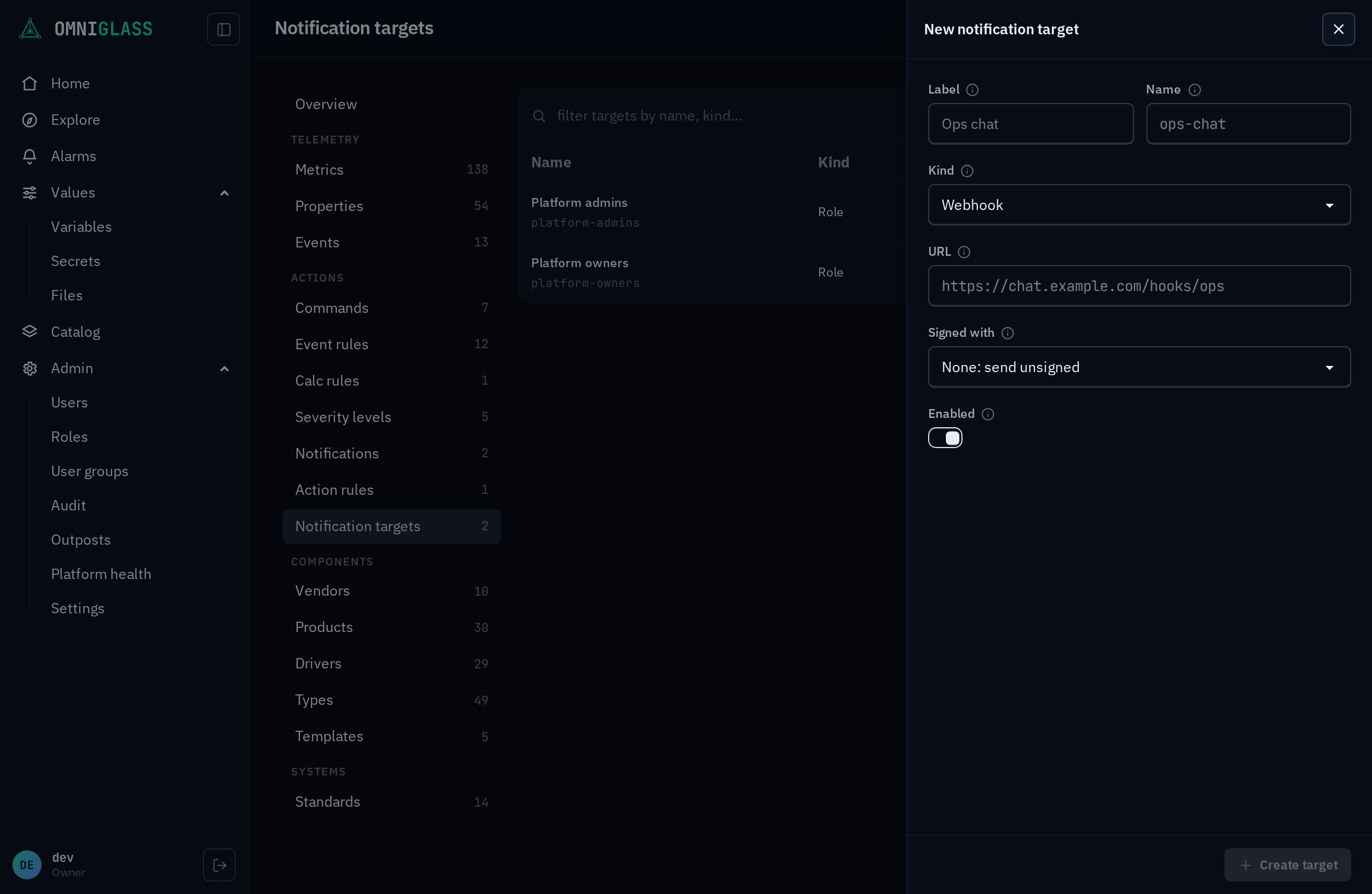
The new target’s panel opens. Send a test sends one synthetic message (transition test)
exactly as a delivery would, and shows what the receiver said: Delivered: the receiver answered
200, or why not (the receiver answered 401, an address the allow list does not name, a
certificate that does not verify, a host that does not resolve). The URL reads masked from then on,
to its scheme and host; Reveal shows it whole, and every reveal writes an audit row of its own.
Edit changes the label, the URL (left blank, it keeps the stored one) or the secret, and
Disable stops deliveries to it while keeping it. The panel also names the rules that send to the
target, since one a rule still sends to cannot be deleted, and lists what was recently sent to it.
The same from the CLI:
omniglass secret create --name ops-chat-signing --owner-kind platform --secret-type hmac-key \ --fields '{"key":"<the shared key>"}'omniglass notification-target create --name ops-chat --kind webhook \ --url 'https://chat.corp.example/hooks/ops' --secret ops-chat-signingomniglass notification-target test ops-chattest answers {"ok": true, "status": 200}, or ok: false with the reason, and
omniglass notification-target reveal ops-chat returns the URL whole, audited the same way.
Each delivery is a JSON envelope (the rendered subject and text, the alarm’s id, its facts, a
version), signed over the exact bytes sent: an X-Omniglass-Signature: sha256=<hex> hmac over the
X-Omniglass-Timestamp, a . and the body. The Idempotency-Key header is the notification’s id,
the same on every attempt, so a receiver can drop a redelivery.
3. Say when
Section titled “3. Say when”An action rule sends on an alarm’s raised, cleared, or both, when its predicate holds. The
predicate reads the alarm’s facts (component, location, severity, severity_rank, message,
rule, …); severity_rank >= 40 is high and above. On Catalog, under Actions: Action rules,
choose New action rule: the transitions, the When (checked as you type, each fact it may name
listed beneath with its type, a mistake pointed at by line and column; empty sends on every alarm),
the targets to send to, and optionally a notification type.
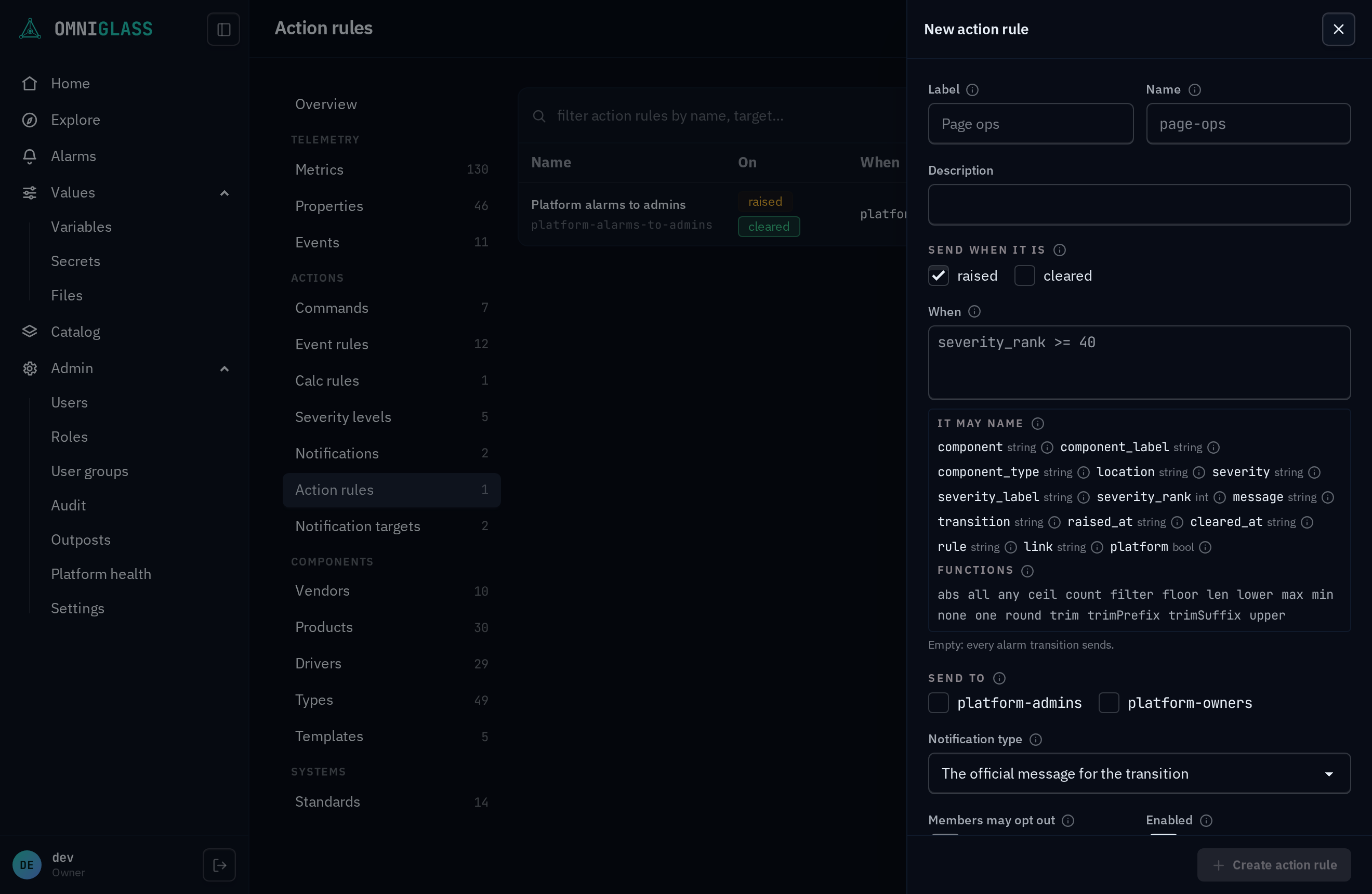
The rule’s panel shows what it sends and to whom, and its recent notifications: each message’s component, edge, target and how its delivery stands (on its way, sent, failed with the reason, or snoozed with the reason), picked from the newest 500 notifications you can see. Disable pauses the rule and Enable resumes it. From the CLI:
omniglass action-rule create --name page-ops --on '["raised","cleared"]' \ --when 'severity_rank >= 40' --targets '["ops-chat"]'omniglass action-rule update page-ops --enabled=false pauses the rule (nothing queues while it
is off; what it already queued still delivers), and --enabled=true resumes it from the next
transition, exactly as the panel’s switch does. Without a --notification-type, a raise sends the official alarm-raised message and a clear the
official alarm-cleared one. Acknowledging an alarm never sends anything; clearing one does,
whoever clears it.
4. Say what (optional)
Section titled “4. Say what (optional)”The shipped types read well in most chat tools:
| Type | Subject | Text |
|---|---|---|
alarm-raised (Alarm raised) | [{{.SeverityLabel}}] {{.ComponentLabel}}: {{.Message}} | {{.ComponentLabel}}{{if .Location}} at {{.Location}}{{end}} raised a {{.SeverityLabel}} alarm: {{.Message}}
Raised at {{.RaisedAt}}{{if .Rule}} by the rule {{.Rule}}{{end}}.
{{if .Link}}{{.Link}}{{end}} |
alarm-cleared (Alarm cleared) | [Cleared] {{.ComponentLabel}}: {{.Message}} | {{.ComponentLabel}}{{if .Location}} at {{.Location}}{{end}} cleared its {{.SeverityLabel}} alarm: {{.Message}}
Raised at {{.RaisedAt}}, cleared at {{.ClearedAt}}.
{{if .Link}}{{.Link}}{{end}} |
To say something else, write your own on Catalog, under Actions: Notifications and name it on
the rule. The page previews a type, or the draft you are editing, against a real component’s most
recent alarm through the same engine a delivery uses, beside every fact the rules could have
read; omniglass notification-type preview <type> --component <component> does the same.
Tell people: a group’s inbox, and email
Section titled “Tell people: a group’s inbox, and email”A target can name people instead of a URL: a user_group target tells every member of a
group, and a user target one person, on the channels it names. inbox is the console inbox
(the bell in the shell); email is each person’s directory email, sent through the install’s mail
relay (below). Binding a group takes user_group:read:admin and binding a person
user:read:admin, both admin’s.
On the Notification targets page these are the Group and Person kinds, each with the channels it tells on; neither takes a test, since people are told only about alarms.
omniglass notification-target create --name on-call-page --kind user_group \ --user-group on-call --channels '["inbox","email"]'omniglass action-rule create --name page-on-call --on '["raised"]' \ --when 'severity_rank >= 50' --targets '["on-call-page"]'The group is read at every alarm, so adding someone to on-call is all it takes to page them next
time. Each member is told only about an alarm on a component they can read: a member whose grants
do not reach the component gets nothing about it, on any channel, and an email still waiting to send
to a member who has since lost that component, or left the group, or after email was taken off the
target, fails with the reason instead of sending. A person can read their own inbox (omniglass auth me notification list); who an entry was
for is shown to them and to admins, and withheld from everyone else who can see the alarm.
To send to a shared mailbox instead, make an email target with its addresses:
omniglass notification-target create --name ops-mailbox --kind email --addresses '["ops@example.com"]'omniglass notification-target test ops-mailboxTell whoever holds a role
Section titled “Tell whoever holds a role”A role target tells everyone holding a role, directly or through a user group’s grant, read from the
grants at every alarm: grant someone admin and the next alarm tells them, with no group to keep in
step. Binding one takes role:read:admin and user:read:admin. The Notification targets page lists,
shows and edits a role target; its create form does not offer the kind yet (#2017), so make one with
the CLI:
omniglass notification-target create --name site-admins --kind role --role admin --channels '["inbox"]'Omniglass’s own alarms already reach somebody. A fresh install ships the platform-alarms-to-admins
rule (when: platform, true on a server’s or an outpost’s own alarms) sending to two role targets,
platform-admins and platform-owners (owner does not inherit admin, and the first user is an owner),
on the inbox. They are marked official: their role and channels, and the rule’s edges and when,
are put back on every start and read-only, and none of them can be deleted. Their Disable is yours
and survives a restart, as do a target’s label and any target you add to the rule:
omniglass action-rule update platform-alarms-to-admins --targets '["platform-admins","platform-owners","ops-mailbox"]'The mail relay
Section titled “The mail relay”Email goes through one relay, set in the notification settings namespace. Store its login as a
platform secret of the basic-auth type, then point the settings at it (binding the secret takes
secret:bind on it):
omniglass secret create --name relay-login --owner-kind platform --secret-type basic-auth \ --fields '{"username":"omniglass","password":"<the relay password>"}'# Settings > notification, or PATCH /api/v1/settings/notification:{"mail_relay": "smtp.example.com:587", "mail_security": "starttls", "mail_from": "Omniglass <alerts@example.com>", "mail_secret": "relay-login"}starttls (the default) needs a relay that offers it, tls is implicit TLS (port 465), and none is
only for a relay egress_allow names, such as the mail simulator a lab or a test runs
(omniglass sim mail, which keeps what it is sent and sends nothing on). An internal relay is reached
only when egress_allow names it, as for a webhook.
Reading a delivery
Section titled “Reading a delivery”Every notification joins its alarm’s timeline after the edge that queued it, as a status row rather than a sentence: its target, a status pill, and the action rule that queued it.
notify ops-chat [sent] action rule page-opsnotify ops-chat [failed] action rule page-ops the receiver answered 503 (3 attempts) [Retry]notify ops-chat [snoozed] action rule page-ops the alarm is snoozed until 2026-10-29 14:30 UTC by rootnotify ops-chat [on its way] action rule page-opsOn its way while it is queued, sent when the receiver answered 2xx, failed with the reason
when it gave up, snoozed with the reason when the alarm
was snoozed
(a snoozed row is final: it is never sent or retried). The same pill, in the same words, marks each row
of an action rule’s or a target’s recent notifications. The action rule is labelled, not a “by”: the
rule queued the message, and who snoozed the alarm is on the timeline’s own snoozed by audit line.
A row a person’s own subscription wrote has no target: it names the person and the channel
(alice (email)), or a person to whoever may not see who, and then shows neither its rule nor
its reason. A receiver that is down is retried: 10 seconds, then doubling,
until the 8th failed attempt (about 21 minutes in all). A failed one carries Retry on the
timeline for whoever holds notification:retry (operators do), or:
omniglass notification list --status failedomniglass notification list --status suppressedomniglass notification retry <id>A notification about a component outside your scope is not listed, exactly as its alarm is not.