

Secrets
BuiltA secret is an encrypted-at-rest value (an SNMP community, a set of basic-auth credentials): typed, owned at one scope, and resolved down the cascade so the most-specific owner wins onto a component. Its plaintext sibling is a variable. The model underneath is config and credentials.
The directory
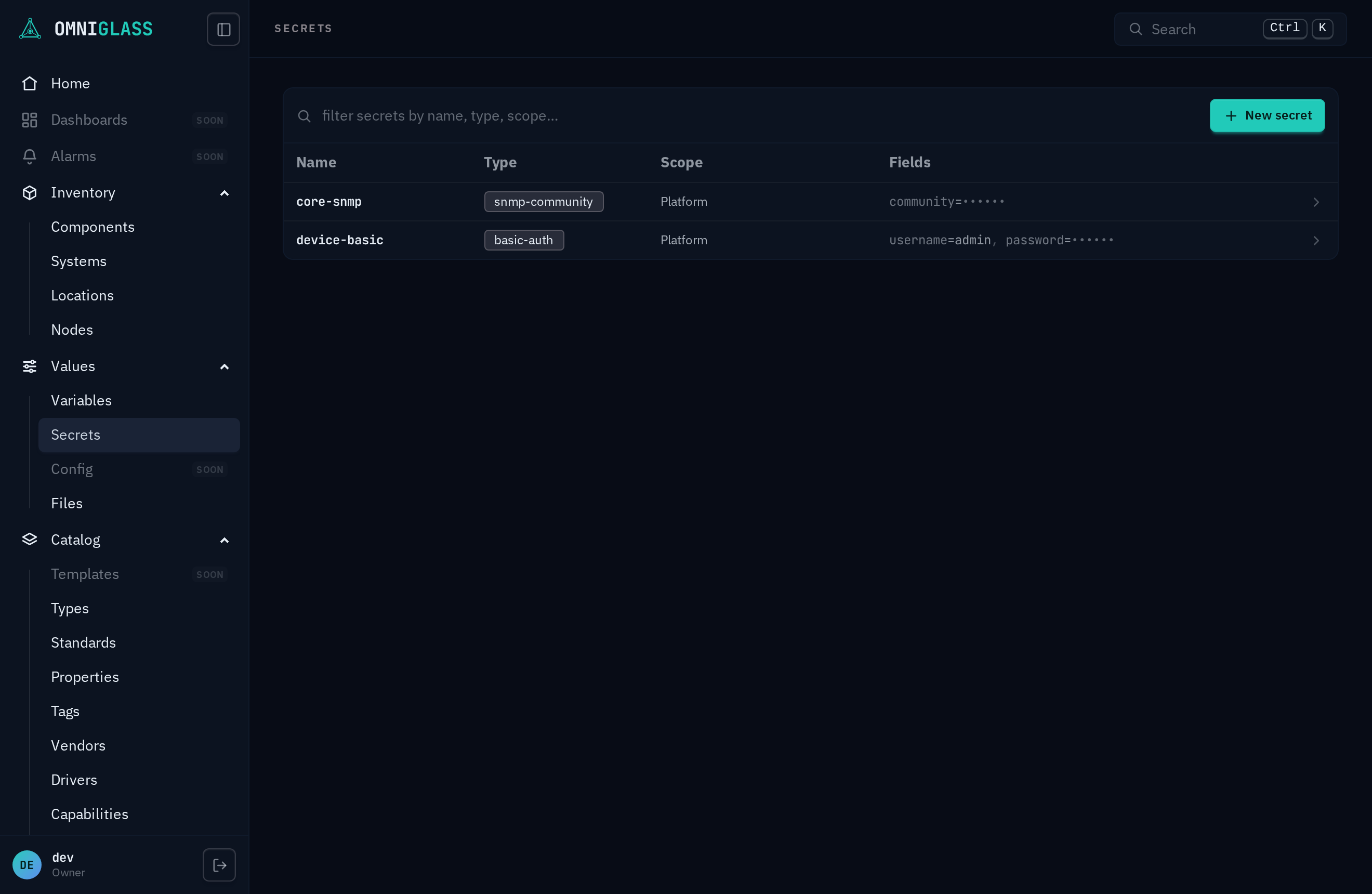
Section titled “The directory”Values > Secrets (with secret:read) lists every secret you may see. Each row shows its name
under its label where it has one, a type badge, a scope label (Platform, or the location
or component it attaches to), and a masked field preview (••••••, never a value). The list
reads in label order, with the secrets that carry none at the end, and the same chip filter as the
fleet lists narrows it.
secret is a sensitive resource, off the *:read floor, so a plain read-everything viewer
does not see this page at all; an operator or deploy holds an explicit scoped secret:read
and sees the secrets in its subtree. The directory is scope-filtered (you see your subtree, not
the whole fleet) and hides admin-sensitive secrets (platform credentials) from anyone below
admin, so their existence and field names never appear to an operator.
Secret types
Section titled “Secret types”Every secret takes a type: a shape declaring the fields a secret of it expects, each with a scalar type and whether the field is itself secret (masked and encrypted). The type is what the create drawer renders as inputs. The shipped set, rendered from the seed itself:
| Type | Fields | Admin-sensitive default |
|---|---|---|
snmp-community (SNMP Community) | community (secret) | no |
basic-auth (Basic Auth) | username password (secret) | no |
ssh-key (SSH Key) | username private_key (secret) | no |
bearer-token (Bearer Token) | token (secret) | no |
api-key (API Key) | key (secret) | no |
oauth2-client (OAuth2 Client) | client_id client_secret (secret) | yes |
webhook-token (Webhook Token) | token (secret) | no |
hmac-key (HMAC Key) | key (secret) | no |
The types are authoritative reference data, upserted on every boot, so a release can correct a
shape and the correction lands everywhere. They are read-only for everyone: there is no create
route, and their page (/secret-types, reached by URL, with no subrail entry) shows each type’s
fields in a detail blade whose footer reads “Read-only: this catalog ships with Omniglass and has no write
route.” in place of Edit and Delete. The gate is secret:read, the same as the directory: whoever may read secrets may read
the shapes they take, and nobody else. See the seed
model.
Each type also carries a sensitivity default: an integration type like oauth2-client mints an
admin-sensitive secret (admin and owner only), a device type an operational one.
Create
Section titled “Create”New secret (with secret:create) opens a create drawer:
- a name: lowercase letters, digits, and hyphens, no dots and no underscores, unique per owner; the cascade resolves by it;
- a type, from the set above;
- a scope (platform, location, or component; a secret has no system band, ADR-0052), then the entity itself from the shared tree picker;
- the type’s fields, with a password input for each secret field.
A platform secret is install-wide, so it needs an all-scope grant plus platform:create on top
of secret:create; without it the Platform scope is not offered, and the form says which
capability that takes. Creating an admin-sensitive secret requires the admin tier, so an
operator can mint only operational secrets.
Reveal, bind, and rotate
Section titled “Reveal, bind, and rotate”Pick a row to open its detail blade. Fields render masked.
- Reveal secret values (with
secret:reveal) runs the audited decrypt and shows the plaintext with a per-field Copy. An operator reveals the operational secrets in its scope; an admin-sensitive secret is admin and owner only (anyone below admin gets a non-disclosing not-found). Every reveal is written to the audit trail. - Binding a secret (naming it as an endpoint input, a notification target’s signing secret, or
the mail relay’s login) is its own permission,
secret:bind, separate from reveal: it decides who may choose where a credential is sent, not who may read it. A role can bind without revealing, which is what an agent holds, since an agent never reveals. - The footer Edit pencil (with
secret:update) opens inline field edit; a blank secret field keeps its stored value, so you rotate one field without re-entering the rest. Delete (withsecret:delete, admin and owner) sits behind a confirm. On a Platform row both also need the matchingplatform:<action>; holding only the secret half leaves the blade read-only with a note naming what is missing.
From the CLI
Section titled “From the CLI”omniglass secret list / create / update / reveal / copy / delete, and
omniglass secret-type list for the types (see the CLI reference). Each takes the
secret by name: omniglass secret update demo-panel-login --fields '{"password":"rotated"}'. A name
sealed at more than one owner you can see (a room shadowing the platform’s) is refused with each
spelling that resolves, the owner first: omniglass secret reveal '$platform/demo-panel-login', or
boi.17c/demo-panel-login for the room’s.
Secrets from the environment
Section titled “Secrets from the environment”A platform secret may also be declared by the server’s environment rather than created here, so a container or a Helm chart configures the credential beside the setting that names it:
OMNIGLASS_SECRET__BEDROCK_KEY='{"type":"api-key","fields":{"key":"..."}}'declares the platform secret bedrock-key (the name lowercased, each underscore a hyphen) of type
api-key. The fields must fit the type, and a stored platform secret of the same name fails the boot,
naming both. Its row in the directory reads From environment where a stored one shows its fields,
and its blade names the variable and offers no Edit, Delete or reveal: the value is held in the
server’s memory, never stored or shown, and changing it is a change to that variable and a restart.
Binding it (omnibot’s key, the mail relay, an endpoint’s input) takes secret:bind as for any
platform secret. The model: config and credentials.